Displaying ZFS ARC in htop for System Monitoring
2026-08-10Table of Contents
Steps required to view the status of a ZFS ARC cache in htop.
What is ZFS ARC?
Simply put, ZFS' ARC (Adaptive Replacement Cache) is a feature that stores frequently accessed data in memory, increasing performance when accessing data that is often used and prevents disk wear by not having to repeatedly access the same data directly from disk.
However, it notoriously uses up a lot of memory to do this (this is by design, it is NOT a memory leak!) and can cause confusion when checking to see how much memory is available.
Viewing ARC Status
There are numerous command line utilities that can show you the status of the ARC cache, however it's useful to see these things along with other computer resource information.
To do this, I use htop, a process viewer that expands upon the often built-in top adding many new features.
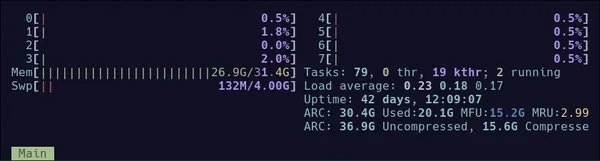
Modern versions of htop have ZFS ARC support ready to go, you just need to enable it.
To do this, simply open htop, press F2 (Setup), then use the cursor keys to select Meters (press 'Down' twice) then across to Available meters ('Right' 3 times) and use the Down cursor key to go down the list until you see ZFS ARC and press Enter. You'll see there's also ZFS CARC, which you may also find useful.
Once done, that information will be displayed to you every time you open htop.
Happy ZFS-ing!